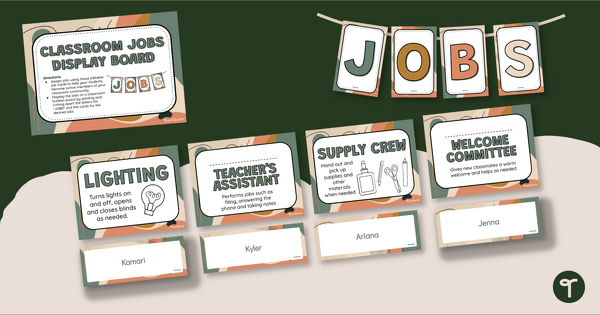
Keep track of classroom responsibilities with a Classroom Jobs Display!
Print the Perfect Classroom Jobs Chart!
You wear many hats as a teacher – lesson planner, grader, organiser, cleaner, and more! It’s easy to feel overwhelmed and stretched thin. But don’t worry – you have a team of eager helpers in your classroom! With our Classroom Job Display, you can assign and track tasks for your students, giving them a sense of responsibility and contributing to a positive classroom environment. Let’s work together to make your classroom run smoothly and efficiently, with everyone feeling valued and appreciated.
This classroom helper display is designed to help students remember their role in the classroom. With simple jobs such as librarian and calendar helper, this teacher tool will make your life easier as you don’t have to keep reminding students of which job they need to do.
How to Display Classroom Jobs
This back-to-school classroom job display board is highly versatile. Some ideas for building your classroom helper bulletin board display are:.
- Create a permanent display with the Classroom Helper cards, and use push pins to attach student names next to job titles.
- Use double-sided tape or velcro strips to attach your display to a wall, cabinet or other smooth classroom surface.
- Attach magnetic tape to the backs of the Classroom Helper Cards and nametags. Then attach them to your magnetic whiteboard and move them as needed.
This classroom helper display board includes
- Classroom Helper Job List – Librarian, Calendar Helper, Line Leader, Messenger, Lunch Monitor, Mail Carrier, Supply Helper, Bag Monitor, Trash Monitor, Technology Helper, Door Monitor, Teacher’s Assistant, Lights Monitor, and More!
- Illustrated and Non-Illustrated Helper Posters
- Editable Name Tags for Students
- A Printable Bunting Banner
Before You Download
Use the dropdown menu to choose the format that works best for you – an easy-to-print PDF or an editable Google Slides or Microsoft PowerPoint version. If you’d like to customise your jobs chart to suit your classroom, select the Google Slides or PowerPoint option. These editable versions allow you to change fonts, job titles, and add your students’ names to match your theme or student needs. The PDF version is perfect if you’re short on time and just want to print and go!










0 Comments
Write a review to help other teachers and parents like yourself. If you'd like to request a change to this resource, or report an error, select the corresponding tab above.