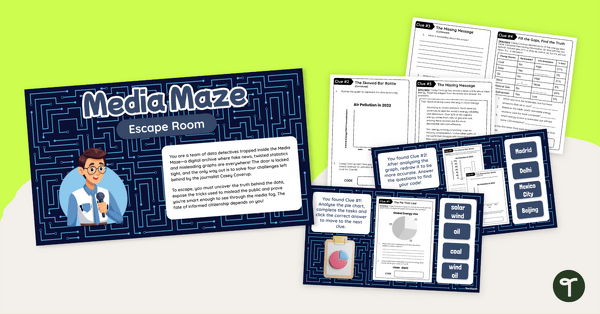
Play our interpreting data year 6 escape room to give your students engaging practise identifying and correcting misleading data displays.
Outsmart Casey Coverup In This Interpreting Data Year 6 Escape Room
Step into Media Maze—an exciting interpreting data Year 6 escape room! Guided by the enigmatic host Casey Coverup, students will navigate a maze of misleading data and media manipulation, all while exploring the timely theme of renewable energy.
With four engaging tasks, learners will sharpen their critical thinking skills as they uncover tricks hidden in graphs, dissect vague pie charts, and expose bias in energy-related articles. Perfect for classroom or remote learning, this interpreting data year 6 activity is a fun, curriculum-aligned adventure that empowers students to become savvy interpreters of data in a media-rich world.
Using Our Misleading Statistical Graphs Escape Room
With just a little bit of preparation, this misleading statistical graphs escape room is ready to go! Here’s how:
Prepare
- Download the escape room and the student notebook in the formats of your choice.
- Print off a copy of the student notebook for each participating student.
Play
- Display the interpreting data year 6 escape room to all students – on an interactive whiteboard if you are using this resource as a whole class activity, or on a device if it is being used as a guided group, partner or independent practice activity.
- Give each student a copy of the student notebook.
- Put the escape room in ‘presentation’ or ‘slideshow’ mode.
- Students will work through the slideshow, showing their work in their notebooks and choosing the correct answer to move on.
- Once students have completed all 4 challenges, they will get a message that they have ‘escaped!’
Downloading This Data Analysis Activity
This data analysis activity is available in both PowerPoint and Google Slides formats, and the notebook has been created as a PDF and Google Slides file. To download them, simply click the drop-down arrow on the download button and choose the formats that work best for you.
Teacher Note: The answer key is included in the student notebook file. Print a copy first before making your student copies.
This resource was created by Kendall Britnell, a teacher and a Teach Starter collaborator.
More Interpreting Data Games and Resources
We have more interpreting data games and resources where this escape room came from! Take a look at the resources below.
[resource:5165337] [resource:4992823] [resource:5165715]


0 Comments
Write a review to help other teachers and parents like yourself. If you'd like to request a change to this resource, or report an error, select the corresponding tab above.