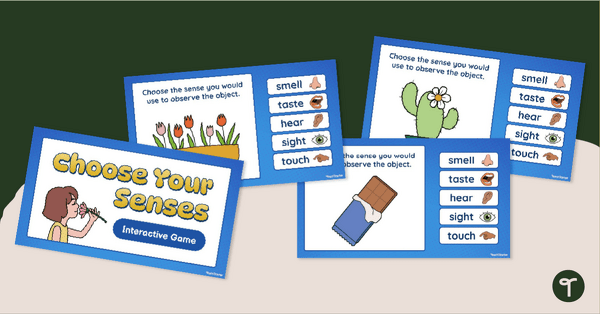
Teach your students about the five senses and how they can be used to observe the world around them with an interactive 5 Senses Game.
Choose Your Senses! Interactive Game
Help your foundation year scientists explore the world around them with a fun and engaging Five Senses Interactive Game for Google Slides! This clickable, kid-friendly activity invites students to examine various objects and everyday items, then choose the sense they would use to observe them.
A 5 Senses Game Your Students Will Love!
This Google Slides interactive game is perfect for whole-group instruction or even independent practise. Students will love clicking through the slides to:
- Identify the senses they would use to explore different objects
- Practise vocabulary such as see, hear, smell, taste, and touch
- Strengthen early science skills
Designed with early learners in mind, the game includes easy navigation, clear visuals, and developmentally appropriate prompts. It’s a great way to reinforce five senses concepts while keeping students engaged.
Download Your Five Senses Game
Getting started is easy! Click the dropdown arrow on the Download button to access your PowerPoint or Google Slides version of the activity. Simply open, present, and play—no prep required.
This resource was created by Lindsey Phillips, a teacher and Teach Starter Collaborator.
More Ways to Teach the Five Senses
Looking for more engaging ways to explore the five senses with your foundation year students? Pair this interactive game with more of our five senses resources today!
[resource:5120488] [resource:13098] [resource:5079612]


0 Comments
Write a review to help other teachers and parents like yourself. If you'd like to request a change to this resource, or report an error, select the corresponding tab above.