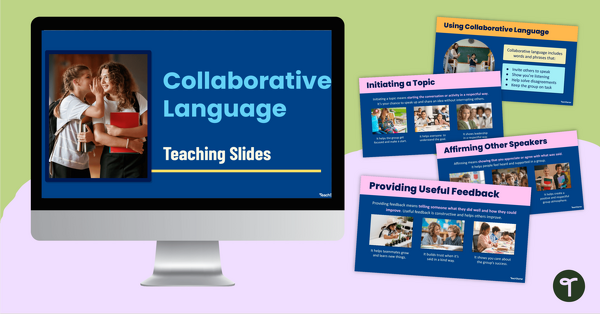
Introduce collaborative language to your students with this easy-to-use slide deck that provides practical examples for developing confident, respectful communication.
Collaborative Language for Successful Group Work
Collaborative group work is a huge part of the learning experience in elementary school classrooms. But how often does group work have less than desired outcomes due to our students’ inability to work together as a team?
Language has a massive role to play in the success (or failure!) of collaborative tasks in the classroom. It is the magic ingredient that enables students to work together effectively, share ideas respectfully and build on each other’s thinking. Teaching our students what collaborative language is (and why it matters!) can help them understand that how they speak to one another is just as important as what they’re talking about!
This comprehensive 46-slide teaching presentation has been created by our team to make collaborative language relevant for your students. The resource covers eight different collaborative language skills:
- Initiating a topic
- Changing a topic
- Affirming other speakers
- Building on others’ comments
- Asking relevant questions
- Providing useful feedback
- Prompting and encouraging
- Checking understanding
For each skill, students will learn what it is, why it matters, and some simple examples they can model and try themselves. By engaging with this resource, students will learn key communication skills that will help create smoother, more productive group work experiences.
Activities for Applying Collaborative Language Examples
Collaborative language becomes real for students when they can apply it in practical ways. After exploring the slide deck, you might like to try the following activities to continue your students’ learning:
- Drama Activity – Divide your class into small groups of three or four students. Assign each group a component of collaborative language, e.g. affirming other speakers. Have the students create a role play showing how the focus type of collaborative language can be applied in a group scenario, then see if the rest of the class can guess which component they were assigned.
- Class Anchor Chart – Create a class anchor chart by working together to brainstorm and record collaborative language examples. Use headings such as “Changing Topics,” “Asking Questions” and “Providing Feedback.” Display the chart in a prominent place in the classroom as a reference tool during future group tasks.
Download to Teach Collaborate Language
This slideshow downloads as either a Microsoft PowerPoint or Google Slides presentation. Use the dropdown menu on the Download button to access your preferred version. (Note: You will be prompted to make a copy of the Google Slides presentation before accessing it.)
These editable file formats can be easily adapted to suit your teaching style and your students’ needs.
This resource provides a flexible, no-prep solution for any teacher wanting to foster a collaborative classroom environment in a structured and supportive way.
This resource was created by Kaylyn Chupp, a teacher in Florida and a Teach Starter collaborator.
Language Matters… Teach It Wisely!
Words are powerful tools, and it is our job to make sure our students are using the right ones! Click below to browse more teacher-created, curriculum-aligned resources for teaching your students about including and supporting others through language.
[resource:5167170] [resource:5145573] [resource:5166690]

0 Comments
Write a review to help other teachers and parents like yourself. If you'd like to request a change to this resource, or report an error, select the corresponding tab above.