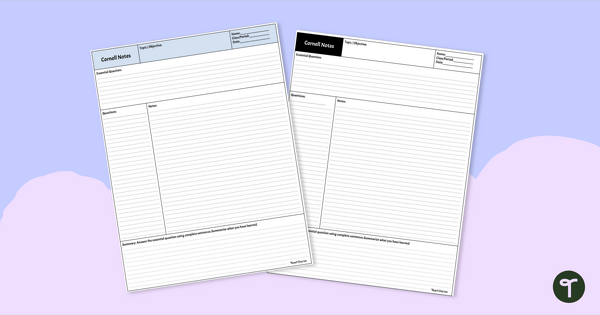
Help your students organize their notes and study for exams with a free Cornell Notes Template.
Enhance Retention Using the Cornell Notes Template
Are your upper-year students struggling with note-taking? Or maybe you need a bit of structure for those advanced education courses that you are taking… Whatever the situation, the Cornell Notes Template is the perfect tool for you!
This Cornell Notes Template is designed for upper-primary and high school students to better organise and learn from the notes they take in class. It’s a breeze to use and makes note-taking and studying much easier.
What is the Cornell Note-Taking Strategy? Using Cornell Template Notes Pages
Are you looking for a way to organise and review lectures or reading material more effectively? Look no further than the highly acclaimed Cornell template notes method! Developed by Walter Pauk at Cornell University, this system has been widely used for years.
Here’s how it works:
- Cornell Template Notes are divided into three sections, including a left column for questions or keywords, a right column for detailed notes, and a bottom section for summarising main ideas.
- While listening to a lecture or reading, jot down key points and concepts in the right column, leaving space for additional details and examples.
- Afterwards, review your notes by covering the right column and using the cues in the left column to quiz yourself or prompt recall.
This method promotes active engagement, organisation, and effective revision, making it a valuable tool for students and lifelong learners alike. Give it a try and see the difference it can make in your studies!
Download and Print Your Cornell Style Notes Template Today!
We’ve created this Cornell Style Notes Template in multiple formats for ease of use. Use the dropdown button to select the printable PDF, Microsoft Word document, Google Docs, Or Google Slides resource file.



0 Comments
Write a review to help other teachers and parents like yourself. If you'd like to request a change to this resource, or report an error, select the corresponding tab above.