teaching resource

Money and Financial Mathematics - Upper Years Interactive PowerPoint

  • Updated

    Updated:  29 Sep 2020

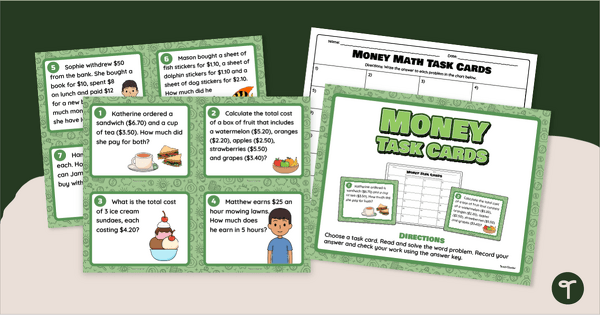
An engaging 44 slide interactive PowerPoint to use in the Upper Years classroom when learning about money and financial mathematics

  • Editable

    Editable:  PowerPoint

  • Pages

    Pages:  44 Pages

  • Curriculum
  • Year

    Year:  5

Curriculum

  • AC9M5N09

    Use mathematical modelling to solve practical problems involving additive and multiplicative situations including financial contexts; formulate the problems, choosing operations and efficient calculation strategies, using digital tools where appropriate; interpret and communicate solutions in terms

teaching resource

Money and Financial Mathematics - Upper Years Interactive PowerPoint

  • Updated

    Updated:  29 Sep 2020

An engaging 44 slide interactive PowerPoint to use in the Upper Years classroom when learning about money and financial mathematics

  • Editable

    Editable:  PowerPoint

  • Pages

    Pages:  44 Pages

  • Curriculum
  • Year

    Year:  5

An engaging 44 slide interactive PowerPoint to use in the Upper Years classroom when learning about money and financial mathematics

Use this interactive PowerPoint Presentation as a teaching resource in the classroom when learning about money and financial mathematics.

As a class, work your way through the 20 problems presented on the 44 slides.

Students choose the correct answer from an option of four. When they select the incorrect answer, the PowerPoint will ‘buzz’, when they select the correct answer, the PowerPoint will ‘chime’ and transition to the answer slide.

Each answer slide breaks down the solution to each problem, creating a great opportunity for student sharing and additional learning opportunities.

To activate the interactive functions on this PowerPoint, ensure that you have ‘enabled editing’ and are viewing the PowerPoint as a ‘Slide Show’.

Use this interactive PowerPoint as a warm up prior to lessons, or as a daily revision when concluding a lesson.

Add new slides and create your own class questions and answers using the editable function on the PowerPoint.

Please note that this PowerPoint is a large file and may take extra time to download.

2 Comments

Write a review to help other teachers and parents like yourself. If you'd like to request a change to this resource, or report an error, select the corresponding tab above.

Log in to comment
  • Judy Tame
    ·

    Great resource

    • Royce (Teach Starter)
      ·

      Hey Judy, thank you for your lovely feedback. I hope your students got a lot out of this PowerPoint.

You may also like